Project intro

SpotDraft’s earlier Salesforce integration was powered by Tray, an iPaaS (Integration Platform as a Service) or third party provider. While it enabled core functionality, it suffered from slow load times due to API delays and a complex, multi-screen setup process. Users often spent 120 mins configuring the integration, manually mapping fields with minimal guidance. This resulted in frequent user frustration, inefficiencies, and a growing support burden. As customer demand for seamless integrations increased, it became clear that a faster, simpler, and more reliable solution was needed.

Duration and contribution

6 months

My contribution included iterating the initial wireframes with the product manager, design handoff while designing for future improvements.

Impact

↓50~75%

Drop in integration setup time, from 120 mins to 30-60 mins

$1.4m

Total ARR unlocked by customers due to significant reduction in integration setup time.

$318,000

ARR generated for SpotDraft from enabling this integration for 50+ customers

Scaled to Hubspot

SpotDraft's integrations team could use the same user flows and components to build an integration setup for Hubspot

UX Problems with Tray's integration setup

8 separate steps to set up the integration.

Too much emphasis on text and explanations over actionables

Not native friendly : Tray’s interface feels separate from SpotDraft, causing a fragmented user experience. Users had to map fields that were not mandatory to be mapped since Tray provides a more generic integration setup that a lot of other customers also use.

Steep Learning Curve and Overwhelming Navigation: Setting up the integration required navigating complex workflows, resulting in setup times exceeding 120 mins and frustrating non-technical users.

Scalability Issues: Each new integration demands building separate workflows, making the system fragile and difficult to scale as business needs evolve, increasing maintenance overhead.

How does native integration setup work?

Salesforce has objects under which they have records (example POC) which can be turned into a lookup field which helps refer that record in another object, for example a user can refer the POC records in the opportunity object by using the POC lookup field. On the other hand SpotDraft has workflows under which they have questionnaires which
will have question fields, for example 'counterparty name'.

Salesforce has objects under which they have records (example POC) which can be turned into a lookup field which helps refer that record in another object, for example a user can refer the POC records in the opportunity object by using the POC lookup field. On the other hand SpotDraft has workflows under which they have questionnaires which will have question fields, for example 'counterparty name'. Users can link and enable as many SpotDraft workflows to one Salesforce object. And link questions present in the workflows to any field present in the object, as well as use lookup fields to refer to another object and map it via that.

Salesforce has objects under which they have records (example POC) which can be turned into a lookup field which helps refer that record in another object, for example a user can refer the POC records in the opportunity object by using the POC lookup field. On the other hand SpotDraft has workflows under which they have questionnaires which will have question fields, for example 'counterparty name'.

Users can link and enable as many SpotDraft workflows to one Salesforce object. And link questions present in the workflows to any field present in the object, as well as use lookup fields to refer to another object and map it via that.

How might we build an industry leading integration setup that users love using?
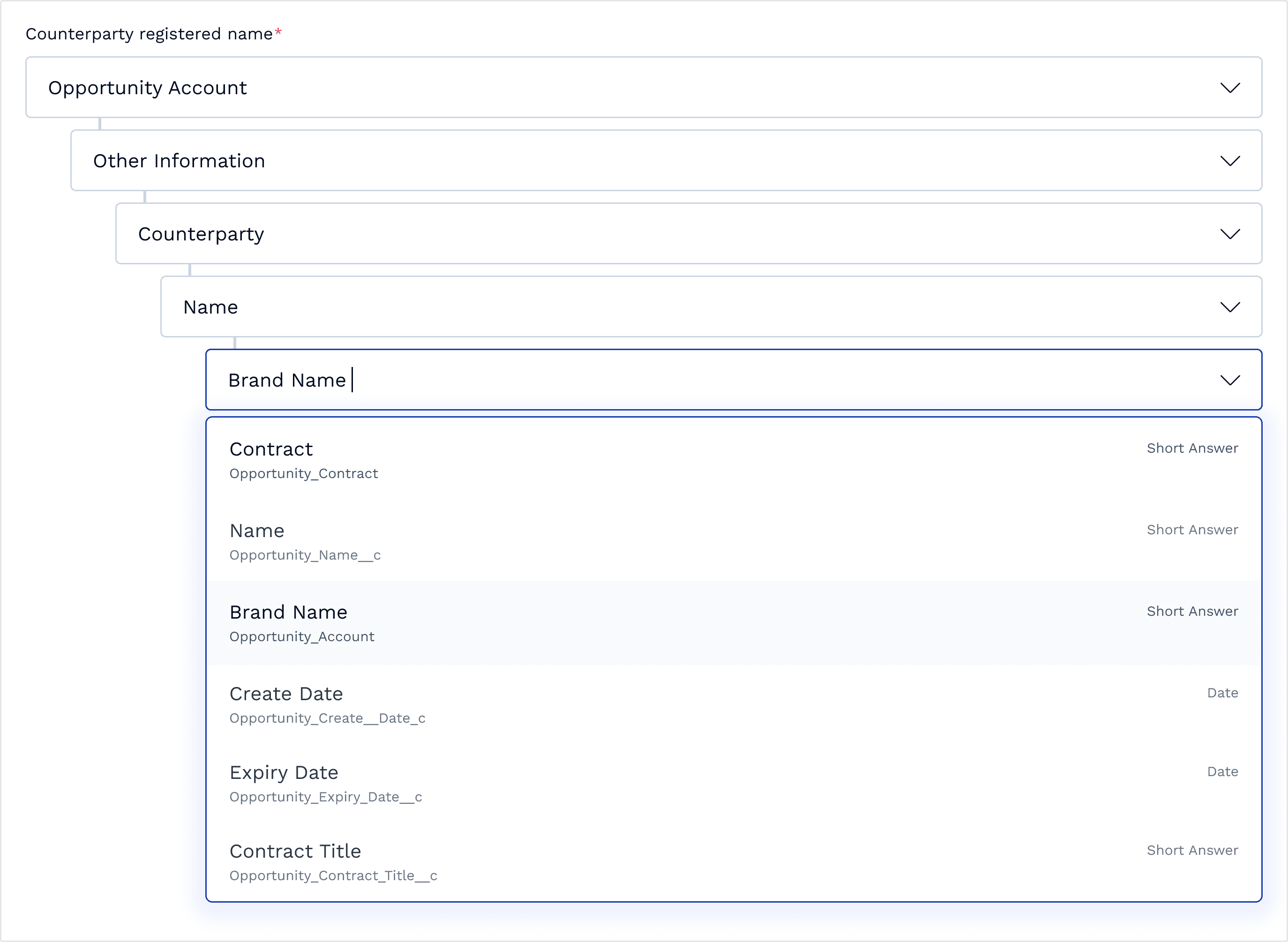
Use nested fields for mapping with lookup fields

Since lookup fields in Salesforce are referencing to other fields in another object and they can be used to add references to as many levels deep as users want (usually 5 levels deep), we had to give a way for users to easily map a question field to those referenced fields via the lookup field. After different iterations we narrowed down on nested fields, with indenting the nested fields. Users can either map a question directly to a field or can map to a reference field 5 levels deep.

Use actual UI references for user recognition while educating

There were multiple points at which we had to convey what users are configuring, and where where the setup configuration will reflect. For example while configuring objects, we used the reference of the Salesforce app and then highlighted the SpotDraft window to show where the object configurations will reflect in the UI.

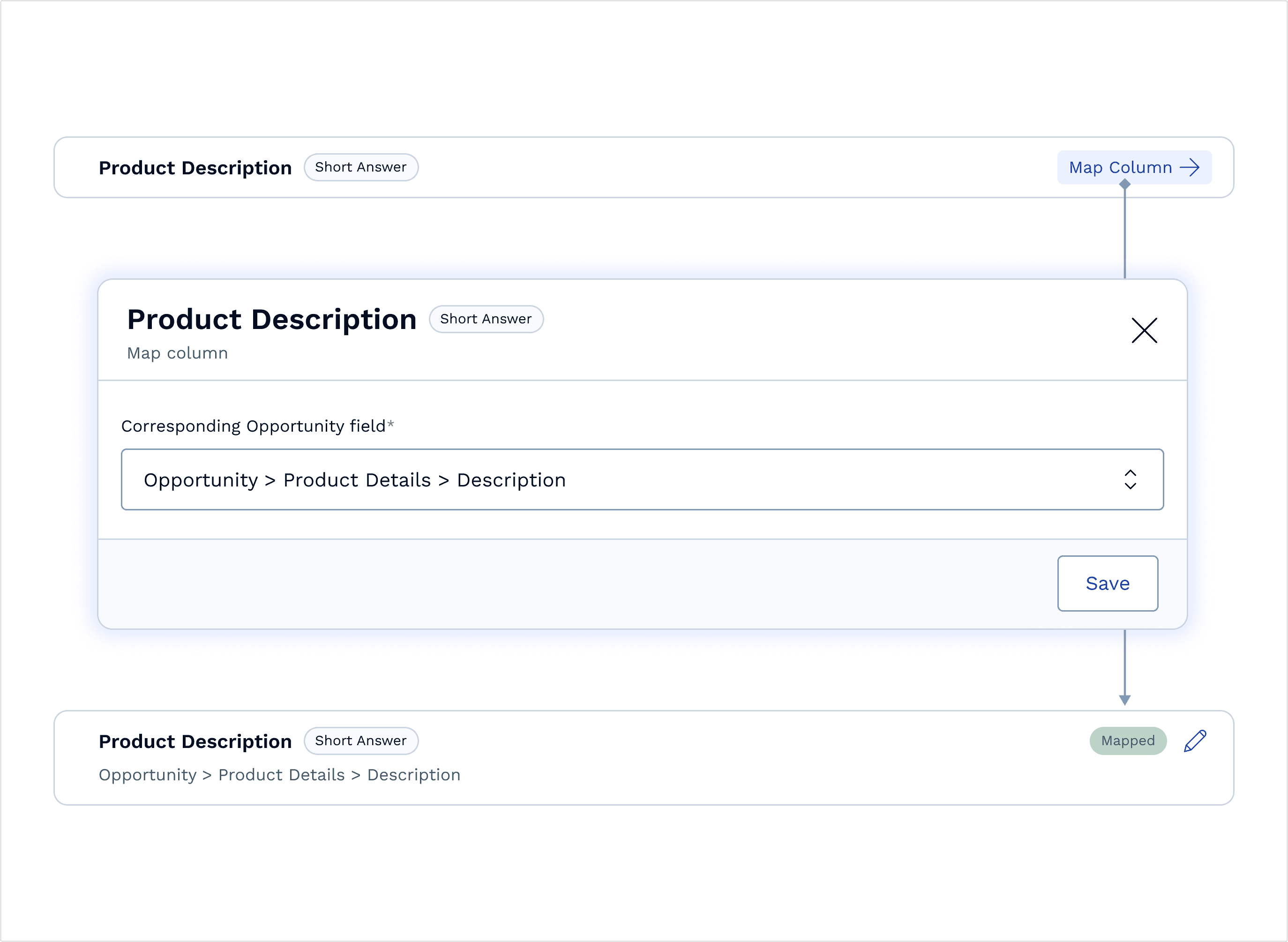
Progressive disclosure for mapping fields in more complicated cases

While mapping a SpotDraft question to a Salesforce field there would be questions which require complicated mapping, an example being Dynamic table. In such a case showing nested fields upfront was starting to take up a lot of UI real estate, as users would have to map multiple columns of the table on after another. So we put the mapping of the column behind a modal where they would see the nested fields for mapping. Once mapped, we would also signify that the column is mapped, while showing the mapping hierarchy in subtext.

Showing errors in mapping when users are filling the questionnaire

One very common problem with the Tray's setup was the blackbox effect post mapping the fields, where users had no way to know if the mapping was done correctly or not. One way to ensure users have clear visibility on the mapping was showing a salesforce icon with and without and error icon next to the question field while filling the questionnaire. This signified whether the mapping was done correctly or not. And if there was an error, explain the exact problem in a popover as user hovers on the error icon.

Walkthrough

Adding and mapping objects

The object configuration is fairly straightforward, users can add as many objects as configured in their connected and authenticated Salesforce account. Users just need to map all the mandatory fields and move on to adding and mapping the workflows and questionnaires.

Salesforce has objects under which they have records (example POC) which can be turned into a lookup field which helps refer that record in another object, for example a user can refer the POC records in the opportunity object by using the POC lookup field. On the other hand SpotDraft has workflows under which they have questionnaires which will have question fields, for example 'counterparty name'. Users can link and enable as many SpotDraft workflows to one Salesforce object. And link questions present in the workflows to any field present in the object, as well as use lookup fields to refer to another object and map it via that.

Salesforce has objects under which they have records (example POC) which can be turned into a lookup field which helps refer that record in another object, for example a user can refer the POC records in the opportunity object by using the POC lookup field. On the other hand SpotDraft has workflows under which they have questionnaires which will have question fields, for example 'counterparty name'.

Adding and mapping workflow questionnaires

Once an object is added and mapped, users can choose which workflow do they want to use in that Salesforce object for creating a contract. Once selected, users can map the questions in the workflow's questionnaire. Each question can be mapped to a field/lookup field while also allowing users to setup what to show in the question field in Salesforce in unexpected cases like: If the field is missing; If the value of the field is null/empty; If the value is not of allowed data types; If the value is unsupported.

Salesforce has objects under which they have records (example POC) which can be turned into a lookup field which helps refer that record in another object, for example a user can refer the POC records in the opportunity object by using the POC lookup field. On the other hand SpotDraft has workflows under which they have questionnaires which will have question fields, for example 'counterparty name'. Users can link and enable as many SpotDraft workflows to one Salesforce object. And link questions present in the workflows to any field present in the object, as well as use lookup fields to refer to another object and map it via that.

Salesforce has objects under which they have records (example POC) which can be turned into a lookup field which helps refer that record in another object, for example a user can refer the POC records in the opportunity object by using the POC lookup field. On the other hand SpotDraft has workflows under which they have questionnaires which will have question fields, for example 'counterparty name'.

Handling errors during Salesforce contract creation

Even though the mapping would seem complete to the user, while creating a contract from inside Salesforce users may see some fields empty or some other value entered in the field which was never intended from their end. For such cases we made a robust error handling and displaying capability which will let users know where the mapping went wrong. In special cases like address we even let users edit the address manually.

Salesforce has objects under which they have records (example POC) which can be turned into a lookup field which helps refer that record in another object, for example a user can refer the POC records in the opportunity object by using the POC lookup field. On the other hand SpotDraft has workflows under which they have questionnaires which will have question fields, for example 'counterparty name'. Users can link and enable as many SpotDraft workflows to one Salesforce object. And link questions present in the workflows to any field present in the object, as well as use lookup fields to refer to another object and map it via that.

Salesforce has objects under which they have records (example POC) which can be turned into a lookup field which helps refer that record in another object, for example a user can refer the POC records in the opportunity object by using the POC lookup field. On the other hand SpotDraft has workflows under which they have questionnaires which will have question fields, for example 'counterparty name'.

Takeaways

Tech knowledge transfer took more time than expected

Though the designs look very simple, coming to those designs was easier than understanding the technical constraints and functionality of how integrations work and how authentication happens between two Saas tools.
The final product could have looked more detailed and crafted if less time was spent in this knowledge transfer from the PM to me.

Quality check

As being a massive QA task to check a native integration setup experience, some areas were left out from the QA, and a lot of those areas included minor UI detailing. I tried to point out as many UI issues as i could. I am still raising Jira tickets to fix these UI issues to this day.

Like what you see?

Contact

+91-9521788932

Email

arpitsingh10c@gmail.com

Made on Framer & Figma
in Bengaluru, India

By Arpit Singh

Making Salesforce Integration Setup Fast and Easy

Making Salesforce Integration
Setup Fast and Easy

Making Salesforce Integration
Setup Fast and Easy

Project intro

SpotDraft’s earlier Salesforce integration was powered by Tray, an iPaaS (Integration Platform as a Service) provider. While it enabled core functionality, it suffered from slow load times due to API delays and a complex, multi-screen setup process. Users often spent 120mins configuring the integration, manually mapping fields with minimal guidance. This resulted in frequent user frustration, inefficiencies, and a growing support burden. As customer demand for seamless integrations increased, it became clear that a faster, simpler, and more reliable solution was needed.

Duration and contribution

6 months

My contribution included iterating the initial wireframes with the product manager, design handoff while designing for future improvements.